
How to Use the Tallula Fabric Power Glider Recliner with Power Headrest
The Tallula recliner is feature-packed and ready to become your favorite seat in the house. In this blog post, we're breaking down everything the Tallula can do so you can take full advantage of your new recliner.

Glide and Recline Features
This is no ordinary recliner: the Tallula has a smooth gliding base, which allows you to gently glide back and forth while seated. Even better, you can engage the power recline and power headrest motions. Each of these operates independently of each other.
So, for example, you could take a seat and enjoy the gliding function until you're ready to recline back and raise the ottoman to rest your legs. Stay here with the headrest down, or decide to engage the headrest for added support.

All of these functions are controlled by the sleek control panel on the outside arm. Even better, you can return all recline positions to 'closed' at the same time by simply pressing the home button.
Manual Folding Headrest for Support
There is a hidden feature that you need to know about: each side of the headrest can fold manually to create side support that cradles the head. You may recognize this feature from high-end airline seats.
To engage the feature, grab onto the side of the headrest and gently pull it toward your head until you reach your desired level of support. You can engage just one side or both. To release the headrest to its starting position, gently push each side back until it is flat once again.
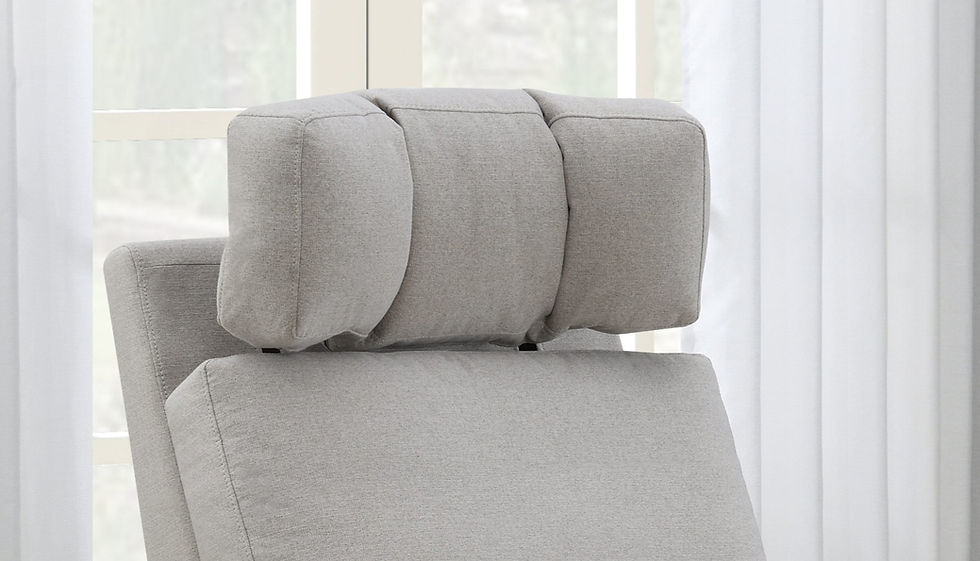
This feature may not seem like a game-changer, but just wait until you're ready to take a nap, recline with a baby in your arms, or completely let your head and neck relax. You will be glad that the Tallula offers this extra support.
LED Lights
Each side of the recliner features a soft, ambient glow that can be turned on and off by pressing a button on the side control panel. Why did we include lights on a recliner? We have some pretty good reasons...

Imagine you are having a movie night and you want the lights dimmed, but not completely off. Instead of having to leave on a lamp or light in an adjacent room, you can turn on the soft, ambient glow of the LED lights on the Tallula. The soft glow provides the perfect atmosphere for relaxation.
Next, picture yourself tending to a baby in the middle of the night. You need to navigate the room but do not want to turn on an overhead light. The Tallula's soft and subtle LED lights provide the perfect solution.
No matter the scenario, this hidden feature can come in handy. It is important to note that this is an optional feature. The lights only turn on when you press the button on the side control panel.
Performance Fabric
This recliner is covered in a soft, tan fabric that has LiveSmart™ performance protection. LiveSmart fabrics are produced exclusively with performance yarns that are encapsulated with a stain and moisture-repellent finish.
Let's say you're enjoying your morning coffee in the Tallula recliner when suddenly your dog tries to jump in your lap, or maybe your child tugs on your arm... coffee spills all over your lap and onto the recliner.

Normally, the liquid would absorb into the fabric, but with LiveSmart, the coffee will bead up on top of the fabric. All you have to do is grab a cloth and gently dab it off the surface of the fabric.
To see LiveSmart in action, watch the video below.
USB-A and USB-C Ports
The USB ports on the control panel allow you to charge small devices, like a phone, from the comfort of your recliner. With this feature, you do not have to worry about your device dying while you watch TV, read your favorite book, enjoy time with family, or tend to your newborn.

Convinced? Shop the Tallula exclusively at Costco.


https://aplicativo.br.com/br/ eu entrei meio no impulso, só pra entender como esse tipo de site de apps e apostas se apresenta, sem ficar procurando jogo nem nada. De cara achei bem “limpo”, sabe? Não tem aquela sensação de página lotada de coisa gritando, então dá pra ler sem se perder. Outra coisa que me chamou atenção é que o texto tá bem no jeito PT-BR mesmo, com termos mais naturais pra quem é do Brasil, o que facilita quando o assunto envolve permissões e explicações mais chatas. Fui rolando e dá pra escanear rápido porque as infos aparecem em blocos, sem enrolação. E gostei que os guias editoriais ficam bem fáceis de achar nos headings do site.
https://vipwin.help/ nhìn qua thì mình liên tưởng mấy trang hướng dẫn mình từng dùng, có cái thì rối và phải bấm nhiều mới ra đúng chỗ. Ở đây mình vẫn hơi dè chừng lúc mới vào, sợ lại kiểu giấu thông tin sau nhiều lớp, nhưng xem vài phút thì thấy họ đặt mọi thứ khá “lộ” và dễ nắm. Mình không đọc kỹ nội dung, chủ yếu lướt xem bố cục thôi. Các khối thông tin chia theo ô và danh sách nên mắt bắt ý nhanh, kéo xuống cũng mượt. Menu để ngay chỗ dễ thấy, đổi mục không phải quay lại nhiều lần nên đỡ mất thời gian. Có mấy bảng dạng cột nhìn thẳng hàng, chữ…
sc8844.com hôm trước mình thấy mấy ông bàn tán nên tò mò bấm vào coi thử cho biết. Vào cái là thấy họ làm kiểu chia nội dung theo từng khối nhìn khá thoáng, không bị nhồi chữ nên lướt nhẹ nhàng. Mình chỉ xem sơ phần giới thiệu tổng quan thôi, thấy viết gọn gàng, có tiêu đề rõ nên đọc nhanh vẫn hiểu đang nói gì. Giao diện chạy cũng ổn, bấm qua lại không bị đứng hay load lâu, cảm giác mượt hơn mình tưởng. Nói chung không có gì quá cầu kỳ nhưng nhìn sạch sẽ, dễ theo dõi. Mình thích nhất là mấy heading kiểu “Tổng Quan” đặt nổi bật ngay trên trang nên khỏi…
Nãy mọi người bàn chuyện mấy nền tảng giải trí online nên mình tiện ghé thử luôn. https://qq88gs.com/ mở ra là thấy họ làm bố cục theo từng khối khá rõ, kéo xuống một chút là mắt tự định vị được mình đang xem phần nào. Mình để ý phần thông tin trình bày kiểu bảng cột, chữ với số canh thẳng nên đọc lướt cũng nắm nhanh, đỡ phải căng mắt như mấy site hay bày lung tung. Cái mình thích nữa là menu điều hướng đặt ngay chỗ dễ nhìn, nên chuyển qua lại cũng trơn tru, không phải mò nhiều bước. Nói chung mình chỉ xem qua cho biết, nhưng kiểu chia khối nội dung + menu…
https://789club1.co/ mình vừa mở lên trong lúc rảnh để xem giao diện nó bố trí kiểu gì thôi. Thường mấy trang dạng này nhìn cái là hoa mắt vì chữ với mục chồng chéo, nên mình cũng hơi dè chừng, nhưng lướt vài phút thấy ổn hơn mình nghĩ. Mấy phần nội dung được chia thành các khối khá rõ ràng, nhìn qua là biết đang ở khu nào và không phải kéo qua kéo lại để tìm chỗ cần xem. Menu đặt ngay chỗ dễ thấy nên đổi trang nhanh, cảm giác điều hướng mượt và không bị “giấu” linh tinh (mình chỉ cần liếc lên là thấy). Nói chung mình không đọc kỹ từng thứ, chỉ chú ý…